When I started building AI agents, I couldn't tell you the difference between a chatbot, an agent, a skill and a workflow. I figured it out by building an agent for my own work, one confusing step at a time. Fast forward, and I now have 11 AI agents working alongside me every day.
This guide explains how an AI agent works and what you need to build one. Then it walks through the steps from an empty folder to an agent that knows how you work. You won't write any code. And if you'd like to build yours step by step on video, that's what our course
AI Agents for CMAs: Build Your First One is for.
A chatbot like ChatGPT or Claude starts every conversation from zero. It doesn't know your role, your company or how you like your work laid out. So each time you open a new chat window, you explain all of it again.
An AI agent uses the same kind of AI model, with one difference. Before it answers, it reads a set of files about you. Those files say who you are and how you want it to talk to you. They also set what it may and may not do, and what it knows about your work. So it starts every chat session already knowing how you work. And because it's all in files, you can open them, read them and change them.
You'll also hear the word skill. A skill is one job written down as instructions, so your agent does that job the same way every time.
A chatbot, an AI agent and a skill | Chatbot | AI agent | Skill |
| What it is | An AI model you talk to in a chat window | An AI model plus files about you | One job, written as instructions |
| What it knows about you | Only what you type in that chat session | Everything in its files | The steps for one task |
| Starts from zero each time | Yes | No | No |
| Example | "Summarize this report." | Answers in your format, for your readers | Drafts variance commentary from budget-versus-actual figures |
The AI model doesn't remember you between chat sessions. Anything you want it to know has to be written down somewhere it reads every time. That's the whole job of an agent's files.
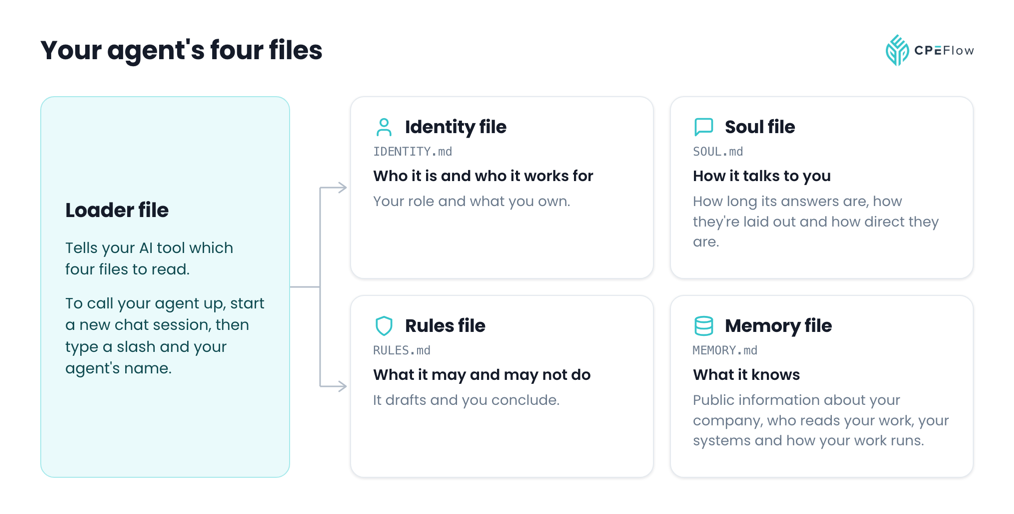
The setup I use, and the one I'd start with, splits that into four plain English files. Each one answers a different question:
- The identity file says who your agent is and who it works for: your role, your company and what you're responsible for. Without it, every answer is generic.
- The soul file sets how it talks to you: how long its answers are, how they're laid out and how direct they are. Without it, you rework every answer into your own format.
- The rules file says what it may and may not do. For example, it drafts and you decide. It never states a figure it can't trace, and it never asks for confidential data. Without it, nothing stops it from guessing.
- The memory file holds what it knows: public information about your company, who reads your work and the systems you use. It also keeps what your agent picks up as you work together. Without it, you repeat the background every time.
Keeping them separate makes them easy to maintain. Your rules rarely change, while your memory file grows every week. And when an answer comes back wrong, you know which file to open.
A short loader file tells your AI tool which four files to read at the start of each chat session.
You need two tools, and only one of them is paid.
- A paid Claude or ChatGPT account. Claude Pro is $20 a month and includes Claude Code. ChatGPT Plus is $20 a month and includes Codex. Claude Code and Codex are the AI tools that read your agent's files. A free plan won't get you through a full build.
- VS Code, a free code editor. You won't write code in it. It's the simplest way to keep a folder of text files open, with your AI tool in a panel beside them.
You also need one job you repeat. Your first agent doesn't need to do everything. It needs to know you well enough to help with one thing.
Start with work you repeat and know well. Weekly status emails, meeting notes and month-end commentary are all good first jobs, because you already know what a good result looks like. That makes your agent's work easy to check.
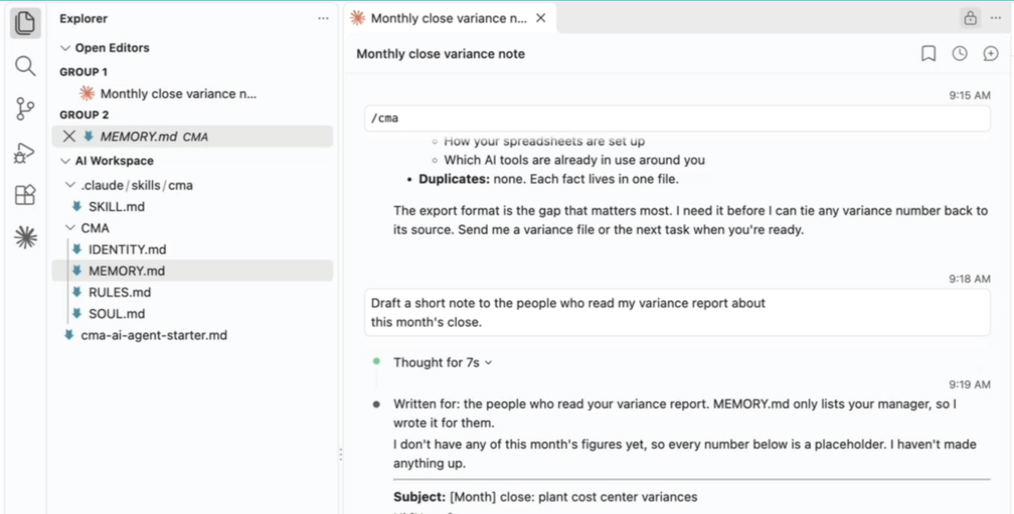
Install VS Code, then add Claude Code or Codex to it. Create a folder for your agent and open it in VS Code. Everything your agent knows will be in that folder, in files you can read.
Write what you'd tell a new hire on their first day. That means your role, who reads your work, the format you want and the lines they shouldn't cross. A few sentences in each file is enough to start.
You don't have to write them alone. Tell your AI tool what each of the four files is for, and ask it to interview you one question at a time. Then have it write your answers into the right file, and read every line before you keep it. Your answers are what make the agent yours.
Start a new chat session and ask something a chatbot couldn't know, such as who reads your monthly report. If it answers from your files, they're working. If it gets something wrong, open the file the answer came from and change the line. The change is still there the next time you start a chat session.
Once your agent knows you, teach it one job. A skill is a file of instructions for that job: what to look at, what to produce, what to leave alone and how the result should read. If you write variance commentary, for example, a skill could set which lines get a comment. It could also set how big a variance has to be before it's worth one.
Check its first drafts against the source until you trust how it works. Your agent drafts. You conclude.
Before you start, read your company's policy on AI tools. It comes first. Then use your rules file to write down what never goes into your agent:
- names of other people (use their role instead)
- figures that aren't public
- transactions or plans that haven't been announced
- anything a written agreement covers
For the unclear calls, use one test: would you put it in an email to someone outside your company? If you aren't sure, leave it out and ask a person.
A written rule is a control, and controls can fail. So open your memory file from time to time and check what your agent has saved.
Get Exclusive Access & Special Discounts!
Get early bird access to new CPE courses and exclusive discounts only shared with our email subscribers.
An AI model can state something false as if it were true. That's called a hallucination, and it's the reason every draft gets checked. Trace each figure back to its source. Check that it followed the instructions you wrote. And check that it didn't invent a reason for something it had no information about.
Your agent knows only what you tell it about your job. It doesn't replace your judgment. It drafts, and you decide what goes out.
Once your first agent knows you, ask it to help write the files for your second one. It already knows your role, your format and your rules, so the second agent starts with less for you to explain.
Here are four jobs where an agent can draft and you review:
- Variance commentary, written for the people who read it, using the threshold you set
- Weekly status emails built from the notes you give it
- First drafts of recurring reports, in your company's format
- Answers about your own processes, drawn from what you've recorded in its files
If you'd like to build your agent step by step on video, that's what our self-paced course is for. AI Agents for CMAs: Build Your First One takes you from an empty folder to a working agent with its first skill. Then you use that agent to build your second one. It has 10 practical video tutorials and is worth 4 CPE credits in Information Technology.
Yes. Your agent is a set of plain English files and an AI tool that reads them. You edit text, and you never write code.
About $20 a month. Claude Pro and ChatGPT Plus are each $20 a month (prices checked October 2026), and VS Code is free.
Either works, because your agent's files are plain text and move between tools. Claude Code runs with a Claude account, and Codex runs with a ChatGPT account. Our course videos are taught in Claude, so that's the easiest one to follow along in.
Start with your company's AI policy. Then keep only public company information in your agent's files, write your confidentiality rules into its rules file, and check its memory file regularly.
Yes. Our self-paced course, AI Agents for CMAs: Build Your First One, is worth 4 CPE credits in Information Technology. State boards of accountancy have final authority on accepting individual courses for CPE credit.

Nathan Liao, CMA
Empty space, drag to resize
Nathan Liao, a Certified Management Accountant, educator, and influential business figure in the accounting industry, has dedicated over a decade to supporting more than 100,000 accounting and finance professionals in their pursuit of the CMA certification. As the visionary founder of CMA Exam Academy and CPE Flow, Nathan is committed to delivering premier online training solutions for the next generation of accounting and finance professionals.